

Everyone is talking about Artificial Intelligence and automation. They are the buzzwords of the decade. But if you strip away the hype and the endless tools, what are you actually left with? For many businesses, the answer is just a faster way to generate mediocre content.
True intelligence and automation, when it comes to nurturing LinkedIn prospects and building a healthy pipeline, isn’t about generating “AI slop” automated connection requests; it’s about building a system that adds value and saves you time or cost.
So how does this work in practice? How can you use AI and automation to deliver real value? This is an example we implemented recently for a client to make the process from finding a LinkedIn prospect to nurturing them as simple as possible.
A real-world example: The LinkedIn nurturing machine
We worked with a business facing a classic sales/marketing dilemma. Their leadership and sales teams would constantly spot perfect prospects on LinkedIn that fit their client profile, people who they wanted to nurture properly, rather than just “connect & pitch”. But how do you get from seeing a prospect online to nurturing them, as the process is convoluted and time-consuming:
- See/find a prospect on LinkedIn.
- Guess their email address or use a separate tool to find it.
- Open HubSpot and create a contact record.
- Copy/paste the name.
- Copy/paste the company.
- Manually assign a sector.
- Add them to an email list.
Because this was high-friction, it rarely happened. The data never made it into HubSpot, and the opportunities died straight away.
The solution: A COMPLETELY AUTOMATED, AI-powered workflow
To solve this, we built a connected system that leveraged AI as a data processor, not just a content writer. Here is the exact workflow architecture that replaced the manual slog.
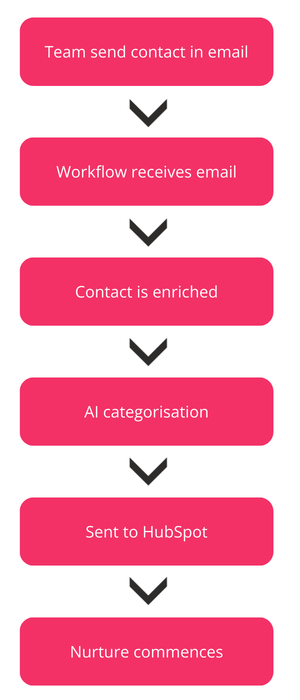
Step 1: Find a prospect, email the link
The lowest-friction action a person can take is to send an email. Now, when anyone sees a target on LinkedIn, they simply copy the LinkedIn profile URL into a blank email and email it to a special address – the only human action required in the entire process.
Step 2: A workflow receives the email
A Make.com workflow is set up to listen for emails arriving at that specific internal address. This is where the automation begins. The workflow “reads” the body of the incoming email and passes it to ChatGPT, with an instruction to grab the LinkedIn profile URL, removing any query parameters (the ?source= type content you often get when you copy a URL).
Step 3: The contact is enriched
Once the system isolates the LinkedIn URL, it then triggers a webhook to the Apollo.io enrichment API. This API takes the LinkedIn URL and returns: full name, business email address, job title, website, company name, and (where possible) phone numbers.
Step 4: AI helps with categorisation
Raw data often doesn’t match your internal segmentation. For example, the API might say a company is in the “Information Technology and Services” sector. But your internal team might categorise that as “SaaS – Enterprise.” We pass the company description provided by the enrichment back to ChatGPT with a custom prompt, which returns the correct, precise business category.
Step 5: Contact created and segmented
With the data enriched and the category defined by AI, the system creates the contact record in HubSpot, assigns the contact and adds them to a relevant nurturing list (segment).
Step 6: Contact commences nurturing
Every week, that contact, who didn’t exist in the database moments ago, receives high-value, non-salesy content via email. They are being warmed up automatically.
Why this approach beats the manual approach
This example highlights the difference between using a tool and building a solution. By combining HubSpot’s workflow engine, external APIs, and AI processing, the results were transformative.
1. Practically zero friction
The sales team never leaves their email client or LinkedIn. They don’t have to log into HubSpot to add data. As a result, the business went from adding a couple of prospects each week to adding dozens daily.
2. Immaculate data quality
Humans make mistakes. We make typos in email addresses; we pick the first option in a dropdown menu just to get it over with. Machines do not get tired. The enrichment API ensures the contact details are verified, and the AI ensures the categorisation is consistent every single time.
3. Immediate actionability
In the old manual world, a contact might sit in the database for weeks before someone remembered to email them. In this connected system, the prospect is immediately routed into a nurturing sequence. The speed to nurture time is instantaneous.
Conclusion
HubSpot’s native AI features in Breeze are fantastic for efficiency. They help you write better emails, summarise calls, and spot trends in your data. You should absolutely be using them. But don’t let your imagination stop at the features listed on the pricing page.
The true power of HubSpot lies in its ability to act as the central nervous system for your entire operation. By integrating external data sources and using AI as a logic engine, not just a creative writer, you can automate the drudgery of data entry.
When you free your teams from the keyboard, you give them more time to do what AI still can’t do: build genuine human relationships.
Ask yourself: “If I can write down the logic for this task, why is a human still doing it?”